for mp3 songs free download

indiafreemp3.blogspot.com

indiafreemp3.blogspot.com


Free Mp3 Songs Download

Thursday, December 12, 2013

Notepad Tips Tricks and Pranks, Toggle Keyboard Button Simultaneously

Using Notepad (and VB) you can set different keys on your keyboard to toggle continuously. Following are the 3 tricks using which different keys can be set to toggle simultaneously. Follow the steps given under each head to try out the tricks.
1. Caps Lock Key
    • Open Notepad.
    • Paste the following code in the notepad file:
Set wshShell =wscript.CreateObject(“WScript.Shell”)
do
wscript.sleep 100
wshshell.sendkeys “{CAPSLOCK}”
loop
    • Save the file with anyname and .vbs extension. and close it.
    • Now open the newly created file and see how the caps lock key behaves on your keyboard!
2. Hit Enter Key Continuously
    • Open Notepad.
    • Paste the following code in the notepad file:
Set wshShell = wscript.CreateObject(“WScript.Shell”)
do
wscript.sleep 100
wshshell.sendkeys “~(enter)”
loop
    • Save the file with any name and .vbs extension and close it.
    • Now open the newly created file and see how the enter key behaves!
3. Hit Backspace Key Continuously
    • Open Notepad.
    • Paste the following code in the notepad file:
MsgBox “Lets Rumble”
Set wshShell =wscript.CreateObject(“WScript.Shell”)
do
wscript.sleep 100
wshshell.sendkeys “{bs}”
loop
    • Save the file with any name and with .vbs extension and close it.
    • Now open the newly created file and see how the key behaves!
In order to end the vbs script (stop continuous key presses), open task manager and end the wscript.exe process as shown in image below.
Read more "Notepad Tips Tricks and Pranks, Toggle Keyboard Button Simultaneously"

Notepad Tips Tricks and Pranks, Convert Text Into Audio Using Notepad

In this post i am going to share a similar notepad trick using which you can convert any text to audio with just a click. And it doesn’t even require you to pay for software or install any 3rd party software on your PC.

How To Do It ?

  1. Open Notepad file on your Windows PC.
  2. Copy and paste the below mentioned code :
    Dim msg, sapi
    msg=InputBox(“Enter your text for conversion – www.google.com”,”G o o g l e’s Text-To-Audio Converter”)
    Set sapi=CreateObject(“sapi.spvoice”)
    sapi.Speak msg
  3. Save this file with any name with .vbs as extension. For eg. Text-To-Audio.vbs

Thats it ! Your Text to Audio converter is ready to be used. Now open the saved file and key in the text you want to convert and click OK. If you find any difficulties in using this code, let me know via comments section.


Read more "Notepad Tips Tricks and Pranks, Convert Text Into Audio Using Notepad"

Notepad Tips, Tricks and Pranks, Open Notepad continuously

Notepad Tips Tricks and Pranks, Open Notepad continuously
  • Open Notepad.
  • Paste the following code in your notepad file:
@ECHO off
:top
START %SystemRoot%system32notepad.exe
GOTO top
  • Save the file with any name nut with .bat extension and close it.
Now open the file and see how it annoys you by opening notepad again and again.


Note : With your own interest only. we are not responsible.
Read more "Notepad Tips, Tricks and Pranks, Open Notepad continuously"

Notepad Tips & Tricks and Pranks, Lock File(s) on Windows Without Using Any Software

How many times have you wished of a software using which you can hide or lock files, restricting its access to other unwanted users. Although there are various software available in market using which you can easily lock/hide files but, i personally dont trust them because most of them are bloatware or spyware.
In this post i am going to share a simple yet powerful way of locking and hiding important files using a the following method. Follow the instructions to make you own Locker ( Without any software !! ) :
  • Open notepad.
  • Copy the following code in notepad file :
cls
@ECHO OFF
title Folder Locker
if EXIST “Control Panel.{21EC2020-3AEA-1069-A2DD-08002B30309D}” goto UNLOCK
if NOT EXIST Locker goto MDLOCKER
:CONFIRM
echo Are you sure u want to Lock the folder(Y/N)
set/p “cho=>”
if %cho%==Y goto LOCK
if %cho%==y goto LOCK
if %cho%==n goto END
if %cho%==N goto END
echo Invalid choice.
goto CONFIRM
:LOCK
ren Locker “Control Panel.{21EC2020-3AEA-1069-A2DD-08002B30309D}”
attrib +h +s “Control Panel.{21EC2020-3AEA-1069-A2DD-08002B30309D}”
echo Folder locked
goto End
:UNLOCK
echo Enter password to Unlock folder
set/p “pass=>”
if NOT %pass%==YOUR PASSWORD HERE goto FAIL
attrib -h -s “Control Panel.{21EC2020-3AEA-1069-A2DD-08002B30309D}”
ren “Control Panel.{21EC2020-3AEA-1069-A2DD-08002B30309D}” Locker
echo Folder Unlocked successfully
goto End
:FAIL
echo Invalid password
goto end
:MDLOCKER
md Locker
echo Locker created successfully
goto End
:End
  • Change the “YOUR PASSWORD HERE” with your password ( Marked as RED above ).
  • Save it as batch file ( with extension .bat ) For eg. Locker.bat
  • Now you will see a batch file. Double click it to create a folder locker ( A new folder named Locker would be formed at the same location )
  • Thats it you have now created your own locker and that too without using any software !
  • Brings all the files you want to hide in the locker folder.
  • Double click the batch ( As created above ) file to lock the folder namely Locker.
Folder lock
If you want to unlock your files, simple double click the batch file again and you would be prompted for password ( In DOS window ). Enter the password and enjoy access to the folder.
Read more "Notepad Tips & Tricks and Pranks, Lock File(s) on Windows Without Using Any Software"

Unlimited SMS Free From Your BSNL Mobile Phone

We have earlier shared mobile phone tricks like a GPRS Hack For Reliance Mobile and it got a fair response so i am sharing a simple trick that will help BSNL users to send free SMS from their mobile phone tweaking just a single setting.

All you have to do is to replace your existing BSNL Message center number with this new working One.
Here is the Message Center Number for free SMS
+919440099997
Please let us know if this trick works for you as these tricks are dependent on various regional locations.


Note : Not working
Read more "Unlimited SMS Free From Your BSNL Mobile Phone"

Send Free SMS From Your Vodafone Mobile

There have been numerous tricks for sending FREE sms from different mobile operators. These tricks or so called Hacks work only for a particular period of time .

All you need to do is :

  • Write the sms in the following format,
SEND Mobile Number Date-Month-Year Time Content
For example, you want to send a sms to Mobile number 9444182217 with content “Hi ! I have found a new sms trick on TechVorm”, then you will write the sms as follows on your mobile phone–
SEND 9971123456 131209 1630 Hi ! I have found a new sms trick on TechVorm
  • After writing the sms in the format given above, just send the sms to 54545 (Toll Free).
Take care of the fact that the Time should be in 24 hours format.
And thats it !


Note : Not working
Read more "Send Free SMS From Your Vodafone Mobile"

Free BSNL GPRS Settings

In this post i am sharing with you a similar hack for BSNL network. And as i say in all the posts involving such hacks there are no guarantees, i CANNOT assure you that this ‘Hack’ will work. NO ASSURANCES are there.

Data Connection Settings

IP : 192.168.87.163

Port : 8080
Home Page : http://www.goog.e.com
APN : cellone portal (address)
Let us know if you were able to get this hack working or have any other related query in relation to working for the above mentioned settings.

Note : Not working
Read more "Free BSNL GPRS Settings"

Tips to Become Success in Blogging

As you know that “Rome was not built in a day” likewise success doesn’t come in a day.
For it you have to struggle a lot. You have to work dedicatedly and honestly to scale heights in your life.
Think positive and be energetic in your work.
If you are doing a work and not getting success in it then just find out where you get wrong, which steps you had taken was wrong.
Note down your negative points, correct your mistakes and then try another time with full strength and confidence; you will definitely succeed.
Success
The same applies for blogging as well, you wont turn into a successfull blogger overnight. Note down your mistakes, strategise on turning them into postitives and you are bound to be successfull ! !
Following are the points which you should consider for achieving SUCCESS in Blogging :-
  • Hard Work : Hard work is the key to success. For achieving success “hard work is must”. Don’t expect to earn money by just writing posts, you need to adopt other ways to increase your presence be it SEO, social networking, etc. You have to work hard to earn money.
  • Positive Attitude : You should have positive attitude and your attitude should display through communication skills, background, commenting manners etc. Do not ever under estimate yourself, think that you have that guts and spirit to achieve success, also think that you are having a certain qualities which are totally different from others. Positive attitude qualities consist of -
    • Power to Assist others.
    • Speaking politely.
    • Giving proper suggestion.
    • Winning Spirit
  • Planning : For blogging success you should plan systematically. You must know your strength and weakness before planning. Read on other blogger’s suggeestions to devise a plan for yourself. A good planner is a good blogger. Remember It !
Laws
  • Knowledge : To survive as a blogger knowledge is must. Without knowledge you can’t earn even a single dollar. As you know that “knowledge is power”. Therefore to utilize this power you should gather as much information as you can.
  • Initiative : You should take initiative in your work. Do right things at the right time without causing delay or waiting for others to do it for you. If you know something put it on your blog, don’t hesitate, your readers will love it. Even if things go wrong, atleast they will know that Your blog was the first one to publish the content !
  • Patience : You should have patience to take appropriate decision and not hasty decision(s). You should also have patience to listen to the views and complaints of your readers. Keep patience, do not quit the job; prove to your boss that you are the best from others. Then see you will definitely become a successfull blogger !
  • Passion : You know the Greeks didn’t write obituaries. They only asked one question after a man died: “Did he have passion?” Unless and until, you are passionate about blogging, you wont be able to continue it. After some time, you might fell burdened (To write posts). Therefore, chose a topic which you think you can write about and are passionate about.
Read more "Tips to Become Success in Blogging"

Internet Download Manager Registration Codes | IDM Registration Codes

Serial Numbers IDM6.12 / IDM6.14 / IDM6.14.1.0 / IDM6.15.6 / IDM6.17.3

Internet Download Manager 6.12
S/N: 7G7QY-NZWKQ-23KRA-RAMQ4
S/N: SPOZ9-2E9IO-AKDRY-LIKEU


Internet Download Manager 6.14
S/N: ZFX1T-5VOMY-ZIT4Y-FHFPD


Internet Download Manager 6.14.1.0
S/N: Y30OZ-DNQH7-FRWPW-YYZMA


Internet Download Manager 6.15.6
S/N: Y5LUM-NFE0Q-GJR2L-5B86I
S/N: 4BTJF-DYNIL-LD8CN-MM8X5
S/N: XAGZU-SJ0FO-BDLTK-B3C3V


Internet Download Manager 6.17.3
S/N: RLDGN-OV9WU-5W589-6VZH1
S/N: HUDWE-UO689-6D27B-YM28M
S/N: UK3DV-E0MNW-MLQYX-GENA1
S/N: 398ND-QNAGY-CMMZU-ZPI39
S/N: GZLJY-X50S3-0S20D-NFRF9
S/N: W3J5U-8U66N-D0B9M-54SLM
S/N: EC0Q6-QN7UH-5S3JB-YZMEK
S/N: UVQW0-X54FE-QW35Q-SNZF5
S/N: FJJTJ-J0FLF-QCVBK-A287M
Read more "Internet Download Manager Registration Codes | IDM Registration Codes "

Android mobile secrete codes

Android mobile secrete codes

Read more "Android mobile secrete codes"

Friday, September 10, 2010

cell tips and tricks

Read more "cell tips and tricks"

Free Rapidshare Premium Account

Free Rapidshare Premium Account

If you’ve been looking for free Rapidshare Premium Accounts for the past decade and finally realized : all the logins and passwords are fake! No problem by itself but you still want that free Rapidshare Premium Account. So that leaves you with 2 options : You can either BUY it ($10/month – is it really worth it? Of course …)
or
EARN it (a few minutes of your time)
Obviously, if you chose the second option you don’t want to spend any money on that Rapidshare account. No one does. Here I’ll tell you how to EARN a Rapidshare premium account. All you need is a PayPal or AlertPay account. Its free and as easy as creating an email account. Next, you’ll have to visit a few paying sites, register and click a few ads in them. Anyone who can use a computer and spare ten minutes can do this. I have given a list of these paying sites below. At the end of this, you’ll be having enough balance in your account to buy your own Rapidshare Premium! And even better, you can use this balance to buy products on eBay, shop online, buy software or just withdraw it. Just follow these steps:
1. Create a PayPal account and an AlertPay account (both are free and will help you collect the money you earn from the websites below)
2.Visit the following paying sites and register:
3.Click ads in each of these paying sites.
4.Receive money into your PayPal and AlertPay accounts.
5.Use this balance to purchase a Rapidshare Premium Account.
That’s it. You’ll have your own premium account in no time. And stop searching for stuff like free Rapidshare passwords, hacks, links, tricks etc. It does not work and by doing so, you are encouraging spam.Good luck!
Read more "Free Rapidshare Premium Account"

Complete Rapidshare Hacks, Tips & Software

Complete Rapidshare Hacks, Tips & Software

RapidShare is a popular free unlimited file hosting
service.

Rapidshare
Many users search for rapidshare software that can working, but there are many rapidshare software couldn’t working at all.
I have tested some rapidshare software (downloader & uploader) and there are free for download.

List of rapidshare software that worked

  • Rapidown, I have tried this rapidshare software. This software is Great! You can download multiple software at the same time, download files with unlimited connection, pause the download, download files without time limit & unlimited download in rapidshare server! But, this software isn’t use english languange, i’m little confuse. The overall of this software is excellent.
    Rapidown Rapidshare Downloader Software
    Download Rapidown
    Password for all archives : www.zepy.net
  • USDownloader V5, This rapidshare software is the newer version of USdownloader, you can select the rapidshare server to download file. This software has been tested by me.
    USdownloader Rapidshare
    This file include openssl, you must install this to get usdownloader working.
    Download USDownloader V5 by nemesis63
    Password for all archives : www.zepy.net
  • Universal Link Checker, Application checks for avaliblity of files shared on various servers. Application requires .Net Framework v2.0
    Supported servers:
    Rapidshare.com
    Rapidshare.de
    Filesend.net
    Megaupload.com
    FileHO.com
    FileFactory.com
    Megashares.com
    Nahraj.cz
    eDisk.cz
    FileHosting.cc
    F-Forge.com
    FilesUpload.com
    Badongo .com/.net
    Download Universal Link CheckerPassword for all archives : www.zepy.net
  • Rapidsearch, Rapidshare Software to search files in the rapidshare server
    Rapidsearch Rapidshare
    Download RapidSearch
    Password for all archives : www.zepy.net
  • Megaupload Link GRabber, This software for megaupload, share.am & Megarotic
    Megaupload Link GRabber
    Download Megaupload Link GRabber
Password for all archives : www.zepy.net

List of Rapidshare Search Engine

Users usually need rapidshare search engine to search files in the rapidshare, so i made some rapidshare search engine list
  • Rapidfox, General Rapidshare Search Engine
  • Rapidsearch.org, You can search album, single song track & video in the rapidshare server via rapidsearch.org
  • RapidshareFiles, I think this is a complete search engine to search files. You can search files in megaupload, rapidshare, uploading & many more. This site is powered some popular search engine like google, yahoo, msn & altavista.
  • Search Upload Server, The toolbar to search over 45 free file hosting.
    megaupload.com
    mihd.net
    mooload.com
    mytempdir.com
    oxyshare.com
    rapidshare.com
    rapidshare.de
    many more….
    This toolbar is fully compatible with IE & Firefox, but i haven’t tried it yet.
    Search Megaupload & Rapidshare

Rapidshare Hacks, Tips & Tricks

Search for files related with dvd

You can use google search engine to search files in the rapidshare server, use one of this methods:
site:rapidshare.com dvd
+inurl:dvd site:rapidshare.com
Note: inurl will search for the URLs that contains the specified keywords only
To search for multiple file format, such as dvd and mp3:
site:rapidshare.com mp3 OR mp3 OR dvd
+inurl:mp3|dvd site:rapidshare.com
Some Another Examples:
To search all video files available on rapidshare…
google: +inurl:avi|mpg|wmv site:rapidshare.com
To search all archives and programs available…
google: +inurl:exe|rar|zip site:rapidshare.com
To search all music files available…
google: +inurl:wma|mp3|ogg site:rapidshare.com

Solve “Download session invalid”

“Download-session invalid. Please click here”
The reason:
Download-session expired. Direct-links last a few minutes for free users and a few days for premium-users.
You requested this download-session from a different IP than yours. If you use AOL, try a different browser.
If nothing helps, getting a premium-account will override the IP-check, which means it will solve this problem.
Trick:
Before you click “FREE” button, shut down your modem and then restart it again.

Rapidshare Protection Links & Anonymizer (Proxy)

Some sites that offer rapidshare protection links


Read more "Complete Rapidshare Hacks, Tips & Software"

Tuesday, September 7, 2010

CheatBook-DataBase 2010 1.0

Publisher’s Description of CheatBook-DataBase 2010 1.0

CheatBook-DataBase 2010 is a freeware "cheat-code tracker" that makes hints and cheats (for PC, Walkthroughs, Playstation, Playstation 2, Playstation 3, Sega, Nintendo 64, Nintendo DS, DVD, Gameboy Advance, Gameboy Color, N-Gage, Nintendo DS, Xbox, XBox 360, iPhone, Gamecube, Dreamcast, Super Nintendo, Wii, Sony PSP) easily accessible from one central location.

If you're an avid gamer and want a few extra weapons or lives to survive until the next level, this freeware cheat database can come to the rescue. Covering more than 19.000 Games , this database represents all genres and focuses on recent releases.

Games are listed alphabetically in the left-hand window. When you click on a game name, the relevant cheat is displayed in a editor window, with convenient buttons that let you print the selection or save any changes you've made. In the latest past many users of the CheatBook- DataBase and readers of the monthly being published magazine have sent to us small error messages and suggestions for improvement again and again.
Many of the suggestions which we received are now realized in the new version 2010.
- comfortable adding of individual cheats
- cheats can be edited more easily now
- separate section with solutions
- files and images can be stored
- simple survey of informations about the cheat
- statistics
- comfortable filter conditions
- consoles cheats added
- 18 different consoles now possible
- search machine was revised
- link manager
- history log
- News and Updates
- private user data base
- Import old Own Bases
- Skins

The program is small and setup is a snap. Once CheatBook-Database is on your hard drive, use it as much as you want because it's free.
Release date January 4. 2010 CheatBook-DataBase 2010 is Freeware for Win95/98/2000/NT/XP/Vista.
All Cheats inside from first CHEATBOOK Jan.98 until toda
Read more "CheatBook-DataBase 2010 1.0"

Tuesday, May 25, 2010

Add The "Add a Gadget" on Header and Blog Posts of Blogger Page Elements

As well as another Content Management System (CMS) base sites (ie : Wordpress, Joomla, Mambo, Drupal etc) Blogger Template consist of Page Elements (header, main, sidebar and footer) and Each element of this page, usually also composed of a few gadgets (the name may be different on each CMS).
Pege Elements are very important. In addition to its function, Elements (Widget) of the page and Gadgets, also affect to the overall look of the pages of our blog.
One of the advantages of a CMS base sites is the Flexibility, In these CMS sites, we could cange the Elements, add or less the Gadgets and also set the appereance (display) of the Page..


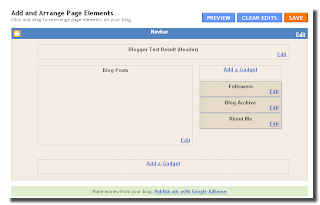
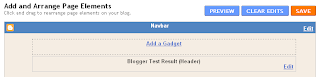
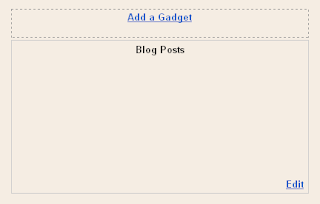
When we first create a Blog in Blogger, the Default Templates consisting of 4 page elements: Header, Blog Posts, Sidebar (which consists of About Me, Blog Archive and the Follower), and a Blank Page Elements at the bottom of blog pages (usually filled with Footer). From the above picture seen that the Header and Blog Posts does not have the facility to add gadgets. To optimize the blog and to be able to add various functions (gadgets) in it, then the Header and Blog Posts must be change.

Let's do it by following this steps:

1 . As usually Log in to Blogger
2. On your Dashboard, select the Layout menu, than click the Edit HTML. Under the Edit Template you can see your Blog's HTML. (please Back up first...!)
3. To have an “Add a Gadget” option, under “Header”, Check the "Expand Widgets Templates" then Scroll down and towards the bottom, you will see these lines (use Ctrl+F to find):
<div id='header-wrapper'>
<b:section class='header' id='header' maxwidgets='1' showaddelement='no'>
<b:widget id='Header1' locked='true' title='Blogger Test Result (Header)' type='Header'>
<b:includable id='main'>
Change with this :
<div id='header-wrapper'>
<b:section class='header' id='header' maxwidgets='2' showaddelement='yes'>
<b:widget id='Header1' locked='true' title='Blogger Test Result (Header)' type='Header'>
<b:includable id='main'>
This will give you 1 more Page Element in your Header. You can add it more by change the number of maxwidgets="..."

4. To add "Add a Gadget" on the Blog Posts, find these lines
<div id='main-wrapper'>
<b:section class='main' id='main' showaddelement='no'>
<b:widget id='Blog1' locked='true' title='Blog Posts' type='Blog'>
<b:includable id='main' var='top'>
Than change with this:
<div id='main-wrapper'>
<b:section class='main' id='main' showaddelement='yes'>
<b:widget id='Blog1' locked='true' title='Blog Posts' type='Blog'>
<b:includable id='main' var='top'>

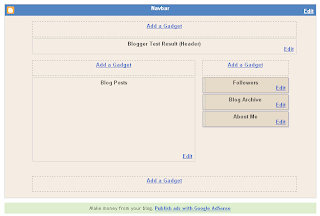
Once You have done, don't forget to Save Template... And You will have :


Finnaly we have a "New" Blogger Page Element ready to optimized...

Simple isn't it...?
Read more "Add The "Add a Gadget" on Header and Blog Posts of Blogger Page Elements"

How To Make a Sticky Post in Your Blogger With a Simple Trick.

Because of the specific goals, sometimes we want every guest who visited our blog, read or see: pictures, messages, or a particular post on all of our blog pages they were visited, it's call a sticky post.
Usually we put the sticky post above the blog post.

In blogger post rule, a new post will be shown on the top, while the older one place below/after it or become archive (depending on your post setting), but with this very simple trick you can remain your post sticky at the top.

Actually this trick is very simple, The key is add the "Add a Gadget" widget above Blog Post in Page Element

By default this widget isn't there, we must doing a little trick first to get that widget. If you do not have Add a Gadget Widget yet, please follow this link http://computerandcelltrics.blogspot.com/2010/05/add-add-gadget-on-header-and-blog-posts.html

The rest step is just to add our Sticky Post (or you can put picture, message, HTML/JavaScript ) by Add a Gadget Widget above the blog post.

If you want to add a "post form" exactly like your post, then you can add a "Text" gadget.
Please not to write your post title in Title Column because it will show up as a "Gadget Title" not as a Post Title, you better write it in Content. and set the display as a Post Title.


The Problem is: to do this trick, we must use HTML code to make up the text... But don't worry, if you are not capable with HTML Codes, there are simple and fast way to make your sticky post without learn it. Use your "New Post" to make a sample of your sticky post, set the display as close as your real post, use the Preview to check your sticky post display then copy-paste into your content collumn text add gadget.

Open your Blogger Dashboard >> New Post. Write your sticky post.


Use Preview to check your final displal, Block your Sticky Post text.


Open your Dashboard in a new Tab >> Layout >> Page Element >> Add a Gadget (above your blogpost) >> Click Text >> Paste your Sticky Post into content column. and Save it.
And this is the final example...

Read more "How To Make a Sticky Post in Your Blogger With a Simple Trick."

How To Make A Sticky Post In Blogger

Sticky posts in blogger blogs are like featured posts in wordpress. By default your blog homepage shows recently published posts but you can keep a certain post as your sticky post and which will stay above all other blog posts. This is great to highlight your best or an important post. This sticky post will be there above all posts no matter how many new posts you publish. All your new posts will get arranged below that sticky post automatically.

Earlier bloggers used to publish a post on a future date to activate this sticky post on their blogger blogs. For an example if you schedule a post to get published on 13-12-2009, this post will be there as the sticky till 13th december 2009. Blogger was not supporting scheduled posts and as a result that post would be there till that scheduled date. But Blogger fixed this bug a while ago and this trick is not working anymore.

So, we have to follow any alternative method to make a post sticky post. Well, we can’t call this a sticky post exactly, because this will not be a post though it will stay above all your blog posts. This can be done with a simple HTML edit. You can also change that sticky contents frequently. You will be having total control over that. Lets discuss about it in details.

1. Navigate to Page Elements >> Edit Template

2. Search for the following code in your template

<div id='main-wrapper'>
<b:section class='main' id='main' showaddelement='no'>
<b:widget id='Blog1' locked='true' title='Blog Posts' type='Blog'/>
</b:section></div>
3. Now inside the above code you can find a code
<b:section class='main' id='main' showaddelement='no'>
.
This code is for the post section. We can edit this code to add another gadget on our post body.


4. You have to change NO to Yes in the above code. That means after editing the code it should look like
<b:section class='main' id='main' showaddelement='yes'>
Save the template.

5. Now navigate to Page Elements and you can notice a new Add a Gadget option there above your post contents. Check out the below screenshot

.

sticky post blogger

6. You can use either TEXT or HTML/Javascript gadget to write your post and then save. This will show your text above all your blog posts.

7. You are done.

This is how you can make a sticky post on blogger blogs.

Read more "How To Make A Sticky Post In Blogger"

How To Install Themes in Google Chrome?

Google Chrome was released only yesterday and there are several tips and tricks already making the rounds including our own Ultimate list of tips and tricks for Google Chrome. The good thing about the Internet is that you can find interesting things quickly.

One such thing we came across was changing the default theme for Google Chrome, though this is not available as a option it can be easily done by following these steps. Google has its own Theme Free Chrome Themes website, but it is not live yet.

Pitchblack___Chrome_theme_by_devrexster

Read more "How To Install Themes in Google Chrome?"

Create Separate Profiles in Google Chrome for Family Members and Stay Extra Safe

If you have started to love Google Chrome and have made it the default browser on your computer, here’s a useful tip regarding your privacy. The tip is more relevant for people who have computers in the living room and that same machine is shared among all other family members.

Google Chrome Address  Bar

The address bar in Google Chrome is almost as dangerous as the awesome bar in Firefox.


Why You Need Separate Profiles in Google Chrome

Google Chrome makes it very easy for you to access your web search history including the search queries that you may have typed in the past. Now this may sometimes lead to an slightly embarrassing situation if someone else use your browser because all your past interactions are exposed the moment he or she begins to type in the address bar.

To prevent yourself from getting into this ‘not so comfortable’ situation, what you can do is create a separate user profile in Google Chrome. Thus all your browser history, bookmarks, cookies, search terms, etc. are not shared with anyone else in the family.

How to Create Profiles in Google Chrome Browser

Unlike Firefox that ships with a Profile Manager, the only way to create multiple profiles in Google Chrome browser is manually. Here’s how:

Step 1: Load Chrome and choose "Clear Browsing History" from the Tools menu. This will clear all your private data.

Step 2. Open your Google Chrome installation folder that is available at:

For Windows Vista - C:\Users\\AppData\Local\Google\Chrome
For Windows XP - C:\Documents and Settings\\Local
Settings\Application Data\Google\Chrome

chrome-profile Step 3: Open Windows Explorer and switch to the "User Data" folder available inside Chrome installation folder.

Then select the subfolder caleld "default" and make a copy of it in the "User Data" folder itself. Give that copy a name, say, Your_Name. (See screenshot).

Step 4 (Optional): We will now initialize this new "Your_Name" profile to the factory default settings.

Open "Command Prompt", switch to the Chrome Application folder and run the following command:

chrome.exe --user-data-dir="..\User Data\Your_Name" -first-run

Step 5: So our new user profile is ready. To run Google Chrome using this profile instead of the default profile, just create a shortcut on your desktop, Quick launch bar or your Windows Start Menu.

Right click anywhere on the desktop, choose New -> Shortcut and type the following for location:

For Windows Vista: C:\Users\Aryaman\AppData\Local\Google\Chrome\Application\chrome.exe –user-data-dir="..\User Data\Your_Name"

For Windows XP: C:\Documents and Settings\User\Local Settings\Application Data\Google\Chrome\Application\chrome.exe –user-data-dir="..\User Data\Your_Name"

chrome-icons Give this shortcut a "hard to guess" name, change the icon to use that of, say, Microsoft Word and you’re done.

Now none of your visits to those "adult sites" would be known to anyone else in the family. And no need for you switch to that incognito browsing mode.

Read more "Create Separate Profiles in Google Chrome for Family Members and Stay Extra Safe"

Run Google Chrome in Ubuntu with WINE

Run Google Chrome in Ubuntu with WINE

One helpful Ubuntu hacker blogger posts a guide to getting Google Chrome working as a stand-alone app in Ubuntu, using the latest version of the Windows translator WINE and a stand-alone copy of Chrome's installer. You'll definitely need your terminal open for this one, and the result isn't exactly flawless—no https support, problems with pop-ups, and a bit slower than you'd get in Windows—but it is a neat way for dedicated Linux users to check out what all the fuss is about. If you're not about to mess with WINE, try putting an emulated Chrome in its own window with our guide to running Windows apps seamlessly in Linux, or wait until the open-source browser eventually makes its way onto the open-source OS.
Read more "Run Google Chrome in Ubuntu with WINE"

LinkWithin

Related Posts with Thumbnails