for mp3 songs free download

indiafreemp3.blogspot.com

indiafreemp3.blogspot.com


Free Mp3 Songs Download
Showing posts with label Making money by Blog. Show all posts

Tuesday, May 25, 2010

Add The "Add a Gadget" on Header and Blog Posts of Blogger Page Elements

As well as another Content Management System (CMS) base sites (ie : Wordpress, Joomla, Mambo, Drupal etc) Blogger Template consist of Page Elements (header, main, sidebar and footer) and Each element of this page, usually also composed of a few gadgets (the name may be different on each CMS).
Pege Elements are very important. In addition to its function, Elements (Widget) of the page and Gadgets, also affect to the overall look of the pages of our blog.
One of the advantages of a CMS base sites is the Flexibility, In these CMS sites, we could cange the Elements, add or less the Gadgets and also set the appereance (display) of the Page..


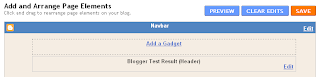
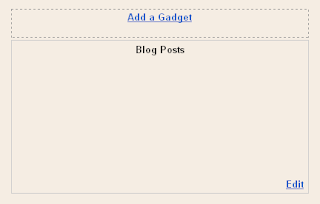
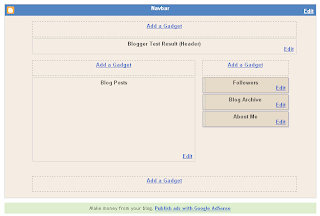
When we first create a Blog in Blogger, the Default Templates consisting of 4 page elements: Header, Blog Posts, Sidebar (which consists of About Me, Blog Archive and the Follower), and a Blank Page Elements at the bottom of blog pages (usually filled with Footer). From the above picture seen that the Header and Blog Posts does not have the facility to add gadgets. To optimize the blog and to be able to add various functions (gadgets) in it, then the Header and Blog Posts must be change.

Let's do it by following this steps:

1 . As usually Log in to Blogger
2. On your Dashboard, select the Layout menu, than click the Edit HTML. Under the Edit Template you can see your Blog's HTML. (please Back up first...!)
3. To have an “Add a Gadget” option, under “Header”, Check the "Expand Widgets Templates" then Scroll down and towards the bottom, you will see these lines (use Ctrl+F to find):
<div id='header-wrapper'>
<b:section class='header' id='header' maxwidgets='1' showaddelement='no'>
<b:widget id='Header1' locked='true' title='Blogger Test Result (Header)' type='Header'>
<b:includable id='main'>
Change with this :
<div id='header-wrapper'>
<b:section class='header' id='header' maxwidgets='2' showaddelement='yes'>
<b:widget id='Header1' locked='true' title='Blogger Test Result (Header)' type='Header'>
<b:includable id='main'>
This will give you 1 more Page Element in your Header. You can add it more by change the number of maxwidgets="..."

4. To add "Add a Gadget" on the Blog Posts, find these lines
<div id='main-wrapper'>
<b:section class='main' id='main' showaddelement='no'>
<b:widget id='Blog1' locked='true' title='Blog Posts' type='Blog'>
<b:includable id='main' var='top'>
Than change with this:
<div id='main-wrapper'>
<b:section class='main' id='main' showaddelement='yes'>
<b:widget id='Blog1' locked='true' title='Blog Posts' type='Blog'>
<b:includable id='main' var='top'>

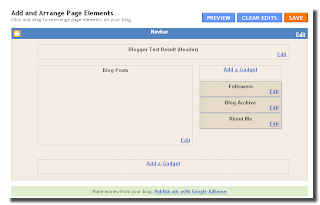
Once You have done, don't forget to Save Template... And You will have :


Finnaly we have a "New" Blogger Page Element ready to optimized...

Simple isn't it...?
Read more "Add The "Add a Gadget" on Header and Blog Posts of Blogger Page Elements"

Wphone – Wordpress on mobile

Before beginning to write about Wphone, i would like you to guess what can this be about ?

Think…………… !

Okay, if you cant think about anything then let me give you a hint, its a wordpress plugin.

Still cant think about anything, fine without further waisting any time, i will start by saying its ’simplified wordpress on phone’.
This plugin was devised to make mobile blogging easy. By using it, you wont be introducing any material changes to your blog, however it will certainly make your life easy if you blog from mobile !

Moving further, you can download the plugin from the wordpress page and in order to install this plugin you need to follow the simple procedure of uploading the plugin to the default plugin directory on your server and then activating it from dashboard.
And thats it ! !
No need for any other configuration !
The rest will be handled by the plugin itself.

Wphone

After installing it, you will notice an option for ‘ Use Mobile Admin Interface ‘ on wordpress login page, as shown below.

wphone

While logging on from your phone, checking that box will result in you logging in a wordpress dashboard specially designed for mobile phones.

Wphone on mobile

My Recommendation – I have been using this plugin for some time and have found it really easy to use however as many plugins do, it also has some bugs like, image uploading, etc. But all in all i would recommend you to use it ( If you blog from mobile a lot ).
Do tell me, how you liked the plugin and if you have better option than this one, do discuss !!!
Read more "Wphone – Wordpress on mobile"

Google Adsense For Mobile Applications

Most of you would have figured out what I mean to say through this post but now let me make it more clear to you all. Google has announced Adsense for mobile applications Beta , a program for those application developers who want to generate revenue from their applications.

The program currently in Beta stage will create direct contact between the advertisers and the consumers and thus in process help the application developers to generate money by displaying text and image ads in their iPhone and Android applications.

iphone_gphone

Advertisers are always keen to reach their target customers by one way or the other and thus advertising through mobile applications is the latest concept promoted by Google through this Beta program ,in-turn the application developers will get a chance to make quick cash and the consumers will get direct access to products of their choice thus saving their time and energy for looking for the desired products and services.

I must say that with these kinds of Innovative ideas Google has a really long way to go ahead of its competitors.

For the official Google Announcement refer Here.

To apply for the Beta program Application developers can apply Here.

If you already are a part of this beta program, do share your experience experience with us.
Read more "Google Adsense For Mobile Applications"

Sunday, May 23, 2010

How Google AdSense Works

Using Google Advertising to Boost Site Revenue


Google AdSense is an easy way to monetize most websites and blogs. The Google advertising system places text and graphic ads onto websites that sign up for the program and install a basic JavaScript code onto each page that will carry a block of Google advertising.

The advertisers are people who have signed up through Google AdWords to advertise their websites or their affiliate links. Those who advertise through Google AdWords choose keywords and pay for their advertising to be seen by those who have those keywords on their sites.

Using Google AdSense to Monetize a Site

Many sites and blogs are monetized with AdSense because it's easy and automatic. Once the code has been added to the page, AdSense automatically delivers the right ads that correspond to the content on the page. The ads chosen by AdSense generally correspond to the advertiser's chosen keywords.

A website or blog owner who is using Google advertising to monetize their site will often use keywords that correspond to ads that will interest the site's readers. Though the site owner can't specifically choose which Google ad that appears on the site, he can choose the type of ads that appear by adding keywords into the text on the page.

Google AdSense Revenue

Most Google advertising runs on the pay-per-click model. Revenue is generated each time a reader sees a Google ad that interests them and they click the ad to learn more. Bloggers and site owners who use Google AdSense for revenue seek higher traffic numbers in order to raise revenues, though higher revenues don't always follow more traffic.

While the amount of traffic to a site often means more readers who click ads, leading to higher revenue coming in, the actual amount of money made per click depends on the keywords used and the competition for those keywords. If competition among advertisers is high, the price for each click goes up. Low-competition keywords may earn the site owner as little as .01 for a reader click.

Google AdSense revenue is payable by check or by direct bank deposit for those who verify their bank account with Google. The minimum payment amount is $100, and payment is made 30 days after the end of the month in which the minimum has been reached. If the minimum is not met, the revenue carries over to the next month.

Customizing Google Advertising

One reason for the popularity of Google advertising is that it can be added to a page in blocks of various sizes. These range from a long, thin block of ads that stretches across the top or bottom of a page to one small Google ad that inhabits a quiet corner of a page. The colors and overall look of the ads are also customizable, making it easy to make the ads blend in with the design of a page.

Read more "How Google AdSense Works"

What is Click Fraud?

Google AdSense Accounts Closed if Fraudulent Ad Clicks are Suspected


As print media experiences a drop in readership and advertising, web-based pay per click (PPC) advertising opportunities through Google's AdWords and AdSense programs are steadily on the rise. But these internet advertising programs are not without flaws; ad click fraud is a serious problem that's prompted Google to take a zero-tolerance stance as the web giant tries to maintain the integrity of its AdSense and AdWords internet advertising programs.

What is Click Fraud?

Click fraud is the act of clicking advertisements on the internet with the intention of earning money or draining a competitor's advertising account. Fraudulent ad clicks are extremely problematic, as it undermines the integrity of the Google AdWords program and other similar internet-based PPC advertising programs that involve clicking on an ad containing a link that, in turn, directs the clicker to the advertiser's web page.

Websites and Bloggers Committing Click Fraud

A large portion of fraudulent clicks come as a dishonest attempt to earn money via Google's AdSense program. The AdSense program enables websites and blogs to display contextual advertisements and with each ad that's clicked, the website or blogger earns a portion of the money that the advertiser agreed to pay per click.

What many fraudulent clickers don't realize is that Google tracks each and every click with IP address logging, among other methods. Red flags arise when abnormal ad clicking patterns emerge over a period of weeks or months, be it a suspicious pattern of ad clicks from a particular IP address or an unusually high number of clicks on the advertisements displayed on a web page.

When click fraud is suspected, the staff at Google investigate the invalid clicks. When a situation involving fraudulent clicks is confirmed, Google typically hands out a lifetime ban from the AdSense program.


Advertisers and Fraudulent Clicks

Another form of click fraud involves advertisers who use ad clicks as part of malicious and unethical business practices.

Advertisers have been known to engage in click fraud by clicking a competitor's web ads in an effort to expend the competitor's pre-set daily spending limit for advertisements. With the Google AdWords program, advertisers pay each time an ad is clicked. An advertiser's ads will "shut off" for the day once the pre-set daily spending limit is reached, so by committing click fraud, dishonest advertisers attempt to eliminate the competitor's internet ads.

Other Forms of Click Fraud on the Web

Another form of click fraud involves a "click exchange." A click exchange involves two or more individuals who, in an attempt to "outsmart" Google, agree to click ads on each others' website or blog.

Dishonest individuals who take part in click exchanges mistakenly believe that they cannot be held responsible for clicks that originate from another person's IP address. In reality, Google is wise to the click exchange, so any suspicious pattern of ad clicks — even those that originate from another person's IP address — that's consistent with click fraud serves as sufficient grounds for a lifetime ban from Google's AdSense program.

Promoting invalid clicks by instructing blog or website visitors to click on ads is another form of click fraud. Promotion of fraudulent ad clicks is considered a serious offense that's grounds for termination of a website's or blog's affiliation with AdSense.

Can You Appeal an AdSense Account Closure Due to Click Fraud?

For many years, there was no appeal process for individuals whose AdSense accounts were closed due to alleged click fraud involvement. But ultimately, Google decided to implement a click fraud appeals process, though it's believed that a very small percentage of accounts are ever reinstated following cancellation due to suspected click fraud.

Read more "What is Click Fraud?"

What Does Cost Per Click Mean in Web Marketing? Read more at Suite101: What Does Cost Per Click Mean in Web Marketing?: Understanding CPC Data to Mak

Understanding CPC Data to Make Money Online with a Blog or Website

Adsense is a great opportunity for those with a website or blog to make cash online. But creating great content does not necessarily mean the web designer will earn lots of revenue. In fact, the webmaster must first understand how to optimise his website by using various webmaster tools at his disposal. CPC or cost per click, sometimes known as pay per click or PPC, is of vital importance to the homeworker’s income and needs to be properly understood.

What is CPC when Optimising a Website?

CPC means the fee charged to an advertiser each time a visitor to a webpage clicks upon the advert displayed. A click on an advert is also known as an “ad click.” Google takes a commission from each ad click and passes on a percentage to the webmaster, who receives it as Adsense revenue. It must be noted that cost per click is different to “page views” or PV, which registers how many visit a particular webpage, whether an advert is clicked or not.

How Much Does Pay Per Click Advertising Earn the Web Designer?

The fee Google charges to the advertiser is determined by many factors. Examples are:

  • The quality of the advertising campaign
  • The wording in the advert used, or “adwords.”
  • The advertiser competition
  • The services or product advertised

Advertising some services attract a higher fee than others. It is generally known that products in the finance industry attracts a higher fee per click.

Pay Per Click Campaign

In order to optimise earnings from a website, webmasters must include certain keywords and phrases within his text to trigger relevant ads upon the webpage, to attract more visitors and also to garner a higher revenue per ad click. Careful analysis of keywords is essential to the webmaster.

Google Adwords Keyword Tool

A visitor looking for particular information will enter a key word or phrase into Google’s search bar, or other search engine to find what he is looking for. For instance, when looking for information on free web space providers, the visitor may type in the phrase “free web space.” The results will provide results that match these keywords. Using the right keywords, are for this reason, crucial for the webmaster if he is to attract traffic. This is known as SEO or Search Engine Optimisation.

Which Keywords

Rather than guess which keywords the visitor may use, the webmaster may use the Google Adwords Keyword Tool which collates all the search terms used by visitors and supplies the results in regards to the most common terms used and the estimated cost per click on the advert generated by the search term.

Google Pay Per Click Website Optimisation

Webmasters have a great opportunity for making Adsense revenue through his web space. However, the webmaster tools must be understood in order to optimise revenue, an example being Cost per click. CPC is the fee charged to the advertiser when a visitor clicks upon his link on a webpage. Google takes the fee and passes on a percentage of the fee to the webmaster who earns it as Adsense revenue.

Making a website visible is crucial to attract visitors and increase the likelihood of gaining ad clicks. It must be noted here that the webmaster must never himself or coerce another to click on an ad for the purpose of earning revenue, which is known as “click fraud” and will cause the webmaster to be suspended.

Read more "What Does Cost Per Click Mean in Web Marketing? Read more at Suite101: What Does Cost Per Click Mean in Web Marketing?: Understanding CPC Data to Mak"

Increase Google AdSense Revenue

Tips to Make More Money with Online Ads

Once a blogger or Webmaster starts Making Money with Online Content, dreams of making even more begin to surface. It’s valuable to know how to increase Google AdSense revenue, making a good thing even better. Master some tips to make more money with online ads, and turn blogging as a hobby into writing as a career.

Anyone can learn how to Use a Free Blog to Make Money at Home, but not everyone knows how to increase Google AdSense revenue as it starts to trickle in. It’s important to create great, fresh online content and offer something that generates a lot of traffic…but that’s not the only trick to making more money with online ads.

Using Google AdSense

Google AdSense is a program used by many, many people online. Web sites from the most sophisticated to the simplest have used this free program to generate revenue. How does it work? One reason Google AdSense is so popular is because it’s easy. After signing up or a free Google AdSense account and providing all necessary URL information, simply decide where to place AdSense code (on some sites, it’s possible to point-and-click to place ads) using an html editor. Ads will continuously refresh and update to reflect the content on the page.

Google provides management options and reports to show Webmasters how much they’re earning through AdSense. But even successful and highly profitable sites could always be more so. Learn some tips to make more money with online ads, and increase Google AdSense revenue.

Increase Google AdSense Revenue

The formula Google AdSense uses to determine revenues is pretty simple. With this program, online ads only earn when visitors are actually clicking on the ads. The money made by the Webmaster or blogger is determined by the cost (per click) of each ad being clicked upon.


This can start to get a little tricky, though on the whole it’s fairly straightforward, only because different keywords equal different payouts. For instance, the phrase “attorneys in California” may offer more cost per click than “monkeys in Cincinnati.” This is why it can be confusing to increase Google AdSense revenue - it’s not just about the traffic…but it is all about the words.

Make More Money with Online Ads

To make more money with online ads and increase Google AdSense revenue, the person providing the content has got to know which words are worth it. In other words, it’s time to become familiar with the highest-paying Google AdSense keywords. Increasing traffic is well and good and obviously should be the goal of anyone providing Internet content, but getting more buck for those words is indeed a worthy pursuit.

  • Weeding out the low-paying ads. Some sites specialize in optimizing pages not to increase traffic, but to increase revenue. By identifying low-paying ads and blocking them, Web sites are left with higher-paying ads that increase Google AdSense revenue.
  • Finding the top-paying keywords. Want to make more money with online ads? Increase Google AdSense revenue by finding the top-paying keywords. Sometimes it’s not quantity but quality. For content writers who are focusing on keywords anyway, it’s not too much of a stretch to focus on keywords that bring in more money.
  • Smoothly integrating ads. AdSense ads should flow smoothly with the rest of the site. The ads should be of the same colors the rest of the page displays, with fonts and link colors that match. Ads should not stick out on the page, but blend in naturally and nicely with everything else.
Read more "Increase Google AdSense Revenue"

Making Money Online with Google Sites

How to Make Adsense Earnings via Google’s Free Website Hosting

Free webspace through Google’s Google Sites negates the requirement of having to buy webspace domains in order to make money online.

Because Google Sites is a Google creation, the webmaster need not have to go through the rigmarole of verifying web pages and generating Sitemaps, because this will have been automatically done by Google.

Free Web Hosting Service

Furthermore, the benefits of using Google Sites takes the headache from having to create and format Adsense codes onto web pages and having to go back and check how the code has affected the appearance of the web page.

Creating Adsense codes is much easier and requires but a click or two. The webmaster can also feel reasonably assured that his hard work will not vanish with this huge service provider, as has happened with some providers in the past.

Making Adsense Earnings Through Google Sites

In order to make earnings from Google Sites, one must first create an account with Google, an Adsense account and a Google Sites account. Google website analytics is a useful tool for those wishing to view the traffic and the average length of time each visitor remains on each Google Site web page.

Features that Google Sites Offer

Google Sites offer the following features:

  • A wide choice of themes, colours and fonts
  • A privacy button for those wishing their site to be viewed by select users, such as a school or business (note, the Adsense program cannot be enabled if the privacy button is selected)
  • Ability to use the Adsense program with ease
  • Automatic verification of website and generation of Sitemap
  • A supportive forum
  • Updates and upgrades
  • Ability to edit the appearance of the sidebar menu and submenus
  • Simple insertion of multi media rich content such as images, spreadsheets and videos as well as a choice of gadgets

Making Higher Search Engine Ranking

As with any URL that begins with the provider’s suffix, in this case, http://sites.google.com/site/ followed by the username, Google search ranking is likely to be within the “supplemental pages” of Google’s indexing, and also, like any other site, will take a while to be indexed by Google.

However with effective use of SEO keywords and by promoting the site with contextual inbound links, as well as a blog, the Google Site webmaster may attract more visitors and therefore more ad clicks, and all for nothing.

Creating Free Domains

The beginner will need to navigate through Google’s tutorials to get a grip with how to proceed with creating a Google Site domain. However, the webmaster may note various limitations on what he can do with the Google Sites page, as the HTML code cannot be edited. For those who find it a little difficult at first, KC Cloud Solutions gives clear and concise advice for the beginner. The bottom line, however, is to make the pages interesting, eye catching and informative for the visitor, which can easily be achieved with the tools Google Sites offer.

Earn Money on the Internet with Google Sites

Google Sites offers free web hosting service for creating team websites that offers many great features including themes and ease of using Adsense. With strategic use of the Google’s Adwords Keyword Tool along with a blog, inbound links and interesting content, the webmaster may make a reasonable living creating interesting and eye catching content without having to part with a penny.

Read more "Making Money Online with Google Sites"

The Difference Between Adwords and Adsense

How the Adsense Programme and Adwords Make Money Online Together

Despite much being written about making money at home from Adsense revenue via Adwords advertising, much confusion still exists between the two. In fact, Google’s Adsense programme and Adwords are really two sides of the same coin.

What is Adsense and how it Works

Simply put, Adsense is a moneymaking affiliate programme provided by Google in the form of small adverts displayed at the side of the web content. The visitor may have arrived at the webpage when searching for specific information and will therefore be presented with adverts targeted within the subject matter of what the visitor is looking for.

For instance, when searching for information about oil paints, the visitor may arrive at a web page describing what oil paints are made of. If the webmaster has exercised appropriate keyword usage, contextual adverts will be generated on the webpage from businesses hawking their services in this area. Examples might be suppliers of oil paints, art brush manufacturers, painting holidays and so forth. If the visitor clicks upon an ad link, the webmaster earns a commission in the form of Adsense revenue.

Other affiliate programmes are available supplying their own list of advertisers, such as Amazon and ClickBank.

Advertise with Google Through Adwords Advertising

Google also sells advertising space to businesses on their own Search Engine Results Page, or SERPS. This is the page that is displayed when visitors search for information on Google before clicking on any blogs, websites or other links.

Google Adwords Management

Adwords is a service provided by Google to help businesses connect with potential customers. By displaying ads alongside web content, businesses are able to raise their profile and hopefully lure visitors into clicking upon one of their ad links by the use of carefully chosen keywords.

In order to help businesses choose their keywords, or “Adwords” wisely, they may conduct research into what words visitors are most likely to use, should they be searching for something within that business area. Google’s keywords research tool can be used to analyse which words are most popular and which are best for niche businesses.

In this way, the business’s advert will appear alongside search results generated by particular keywords the visitor has used.

Examples of Adwords can be found on the adverts found on the side of most webpages. For example, one advert proclaims, “Ecommerce Websites – exquisite bespoke websites free hosting for the first year.” The visitor who requires information on free website hosting services may be presented with this advert on the side of a webpage article giving free website hosting advice.

Some adverts use a combination of keywords and images. In either case, much research should be conducted into which Adwords work and which don’t.

Adwords Adsense and the Difference

Much confusion exists between the difference between Adsense and Adwords. Both are really two sides of the same coin. Adsense is a profit making scheme for webmasters who wish to earn commission from clicks upon adverts displayed upon webpages. Adwords is a Google programme whereby businesses are able to display their ads alongside web content. Carefully chosen keywords or Adwords, are designed to lure potential customers to click upon the advert displayed.

Read more "The Difference Between Adwords and Adsense"

Create a Niche Website & Earn Money Online Read more at Suite101: Create a Niche Website & Earn Money Online: Build Niche Content Sites & Create Pass

Build Niche Content Sites & Create Passive Income Streams


Niche websites are small Internet sites that focus on a very specific segment of a subject or industry. These sites provide highly targeted content to readers in the niche, allowing web marketers to effectively optimize the site for monetization with contextual ads and products of interest to the readership. This is an effective way to generate passive income streams that pay residuals over the long term.

Using Marketing Niche Software to Build a Niche Store or Website

There are many tools and programs available that can help a web marketer build a niche store or website. Some niche software programs provide web templates and a site builder application to help a webmaster quickly build multiple niche sites. Other programs provide keyword research and analysis tools to help web marketers uncover valuable niche opportunities. Some software programs and niche services combine both of these elements in one software package designed to make niche marketing as easy as possible.

However, investing in this type of product or service is not necessary for building successful niche content sites. Niche sites can be created easily and for little expense, even by the novice webmaster.

Create a Niche Website Using WordPress Content Management System

One way to quickly and easily build a quality niche site is to use the WordPress content management system on a self-hosted domain. WordPress is simple to set-up, even for someone new to working on the web, and provides many features and plug-ins that help with search engine optimization and the web writing experience in general.

Additional benefits to WordPress are that the platform is free to use, even for commercial use, and is available for one-click installs through most popular web hosts.

Some marketers also choose to start a niche site on the free blogging platforms at WordPress.com and Blogger.com. However, these sites have some restrictions around the types of monetization strategies allowed, so it is important to read the terms of service to identify potential problems in the strategy.

How Niche Websites Make Money and Create Passive Income Streams

Niche content sites can generate income in a variety of ways, including:

  • advertising services such as the Google Adsense pay-per-click ad model
  • advertising services that compensate on a page view model (CPM - cost per 1000 impressions), which is most effective for high-traffic sites
  • direct banner advertising
  • affiliate product marketing
  • site sponsorships
  • sponsored reviews
  • charging membership fees for premium content

A niche website that is optimized well for keyword phrases and the target audience can be a lucrative source of passive income for online marketers. With some initial research, a conscious approach to creating content, and monetization strategies, web marketers can create a valuable resource for readers and residual income for the online business owner.

Read more "Create a Niche Website & Earn Money Online Read more at Suite101: Create a Niche Website & Earn Money Online: Build Niche Content Sites & Create Pass"

Make Money with Google Adsense & Niche Websites Read more at Suite101: Make Money with Google Adsense & Niche Websites: How to Monetize a Niche Site

How to Monetize a Niche Site with AdSense Pay-Per-Click Ad Model

Read more "Make Money with Google Adsense & Niche Websites Read more at Suite101: Make Money with Google Adsense & Niche Websites: How to Monetize a Niche Site"

Why are Google Ads Not Showing on My Website? Read more at Suite101: Why are Google Ads Not Showing on My Website?: Troubleshooting for Google's AdSe

Google's AdSense program enables bloggers and website owners to earn revenue as they display pay per-click-ads on pages of a blog, website, or blog RSS feed. When a website or blog visitor clicks on one of Google's contextual ads, the blogger or webmaster earns money in their Google AdSense account.

Google ad revenue for a blog or website can reach into the hundreds, thousands, tens of thousands or more, but only if the ads are displayed! There are several problems that can result in a situation where the pay-per-click Google ads aren't showing on the page, leaving bloggers and web gurus looking for Google ads troubleshooting tips.
Stop Words or Poison Words Prevent Ads from Displaying on Blog or Website

The Google ads may disappear from the page if stop words, also known as poison words, are present on the page. Google poison words are terms related to subjects like sex, crime and drugs.

It can be difficult to identify the stop words that are preventing Google ads from displaying properly. The precise algorithm relating to poison words is unknown, but some of the following factors may cause pay-per-click ads may turn off:

* Google ads may not show if multiple instances of one or more suspected stop words are present on the page.
* Certain word combinations constitute a poison word; if used independently, those terms will not prevent the Google ads from displaying, but used in combination, the ads will shut off.
* Poison words are believed to have varying ranks. Ads may be interrupted if term x appears only once, where it may take multiple instances of term y to cause an interruption in the display of Google ads.

A Lack of Relevant Google Ads Causes a Google Ad Blackout

Advertisers with the Google AdWords program select keyword terms that will trigger their ad to appear on an AdSense client's site. So for each page of a blog or website, there is a pool of potential pay-per-click ads. For some blogs or websites, there may be a lack of relevant ads with keywords that match the keywords on the page. This may cause the AdSense ad units to display a solid color instead of ads.

Another reason for a lack of Google ads on a page may result from advertising budget caps set by advertisers in the Google AdWords program. AdWords advertisers set a budget for their online ad campaign; this determines what the daily spending rate will be for a particular ad campaign.

As the day progresses and website and blog visitors click on ads, advertising budgets are expended, causing an advertiser's ads to "shut off" until the following day. As more and more ads "shut off" for the day, the ad pool shrinks. For niches and topics with a limited number of advertisements, this can mean that Google ads will not display for a period of time.

Bloggers and website creators must also remember that the Google AdWords ads are geo-targeted (i.e. ads for Miami businesses are displayed in the Miami area, while Memphis-related ads are displayed to website visitors in Tennessee, and so on), meaning each website/blog visitor will see different ads displayed. So while the blogger may see that her blog is without Google ads when viewed from her location in Boston, a viewer in London may find that all of the ads are displayed if relevant Google ads are available for London.
Public Service Ads are Showing Instead of Paying Google Ads

Public service ads may be displayed if the AdSense account holder hasn't provided all of the necessary information to Google, resulting in a hold on the Adsense account.

When new Google ad units are created, it's possible the account holder selected the option to display public service ads in the event that relevant ads are not available. This can be remedied by editing the settings for the affected Google ad unit. The other options include "Show non-Google ads from another URL" and "Fill space with a solid color."
Other Reasons Why Google Ads Won't Show on a Blog or Website

There are a few additional causes for an absence of Google ads. If the Google ad codes were just recently placed on the page, the ad blackout may be the result of the routine delay that occurs. It takes approximately 10-15 minutes for Google ad units to appear once the HTML code is placed on the page.

Some Google AdSense units may not display ads if there are too many ad units present on the page. Google AdSense policy limits the number of ad units for content that can appear on a page to three units of link ads and three traditional ad units that display contextual text ads or ads containing graphics and images.

Google AdSense revenue will depend on how well a page is optimized for SEO and other factors, like location of ad units and fortunately, most of these Google ad problems can be eliminated or avoided by employing good SEO techniques — like strong keywording — on a blog or website.
Read more "Why are Google Ads Not Showing on My Website? Read more at Suite101: Why are Google Ads Not Showing on My Website?: Troubleshooting for Google's AdSe"

Friday, May 21, 2010

How to Promote Your Blog or Website with a Charitable Fundraiser

Recently, I hosted a "blogathon" on my weblog to celebrate its second anniversary and to raise funds for a local environmental organization. I agreed to spend 24 hours online blogging, and readers could make a "per-post" pledge to the organization, which they multiplied by the number of posts I made to determine their donation. While my readers and I raised a sizeable sum, I quickly realized that combining an online event with a charitable fundraiser created a powerful means of promoting my blog and increasing its readership. Hosting the event created a "win-win" situation that allowed me to both contribute to a cause I believe in and gain wide exposure in 24 hours that I couldn't have obtained otherwise without spending large sums of money.

In this age of ridiculous get-rich-quick schemes and too-good-to-be-true promotional opportunities, the internet marketer can make his/her site stand out from the crowd and attract new customers/readers/clients by doing something many consider unthinkable: raising money for someone else. I've seen the rewards of such an effort, and will share them with you. First, though, I'll show you how I created, managed and promoted my event, and how I received help from much more established blogs and websites in making it happen.

Creating and Organizing the Event

I choose to celebrate my blog's second anniversary because I saw it as a milestone: blogs and web sites come and go quickly, so having succeeded for two years deserved a celebration. Keep in mind that many occasions might hold potential for an event: an anniversary or another milestone (say, a blog's thousandth post), a holiday, a release of a product, a famous person's birthday� the possibilities are endless.

I choose a local environmental organization because my blog focuses on issues of environmental sustainability. A quick scan of a local non-profit directory should provide plenty of ideas if you don't already have one in mind. I suggest staying local because you'll likely have more luck making and keeping contact with individuals at the organization. I also suggest picking an organization with a mission similar to your own � you'll enjoy the process more, and the organization will be happier to help you promote the event if you're already involved in their cause. No matter what your subject matter, you should have no trouble finding numerous organizations worthy of your efforts.

Contact the organization ahead of time. This will head off any embarrassment in case they're contacted about your event, and they will have resources such as press contacts that will be very helpful once you begin promoting.

Contact other bloggers and/or webmasters and ask them to pitch in. I got in touch with many people with similar sites and asked them to contribute a post to my effort. Most were happy to help, as they receive greater exposure and also get to contribute to a cause they also believe in. Nearly all of them announced the event on their blog as the time drew near.

Ask your readers and others for donations. I took pledges prior to the event, and kept a record of the pledgers' names, email addresses and amounts pledged. I was fortunate that the organization already had a web-based donation system in place, so I only had to send my readers to that page to make their donation. I think that not having to handle the money added to the credibility of my effort, as it was clear I wasn't running a scam

Start promoting. I began promoting my effort about a month before the event itself. I devoted posts to explaining the event, and describing different efforts that the organization was taking to promote environmental awareness and action. I sent out press releases to local and online media, and appeared on a local community radio station's environmental program.

The Event

When the day came, I had prepared ahead of time by locating information on which I could post, and collecting guest posts from other bloggers. I set myself a schedule of 2-3 posts per hour, and spread the guest posts throughout the event. I must admit that I didn't quite make the 24 hours (after about 22 �, I was beat), but did reach my goal (which I'd publicized) of fifty posts (including guest posts) during the event.

The Results

Both regular and new readers "showed up" during the event with comments, emails, and updates to their own blogs and sites, and several tried to stay up the whole twenty-four hours with me.

My visitor numbers quadrupled during the event, and have remained much higher than they were prior to it.

My TTLB Ecosystem ranking jumped about a thousand places, and I went from "Adorable Little Rodent" to "Marauding Marsupial."

I've attracted about 25 new subscribers on Bloglines alone.

My Feedburner feed circulation increased by 50%.

Almost a week later, I'm still trying to respond to commenters. I don't have exact numbers, but I've never had the amount of conversation on the blog that I had during the event.

I'm still watching the long-term results, but, without a doubt, holding this event allowed me to take my blog to at least the next level in terms of readership and exposure. While an event itself would have gotten some notice, choosing to celebrate while also raising funds for a non-profit gave the community around my blog several reasons to spread the word, join in the effort and even discuss it afterwards. It was a rewarding experience in a number of ways, and I can't wait until this time next year to build on these initial successes.
Read more "How to Promote Your Blog or Website with a Charitable Fundraiser"

Promote Your Blog

This summary is not available. Please click here to view the post.
Read more "Promote Your Blog"

Promote Your Blog

Promote Your Blog
Well, you've joined the others and have created a blog. It is time to tell the world about your online journal. Most blog services generate an RSS feed. If your blogging software does not create an RSS feed, consider using software like FeedForAll http://www.feedforall.com to create an RSS feed. Like blogs, RSS is growing in popularity and is a great way to spread the word about a new blog.

Syndication is conceptually simple. It allows publishers to distribute content that can be displayed in another location or context. Using RSS, publishers are able to easily create and disseminate content feeds that include news headlines, blog summaries and related links. RSS is the defined syndication standard that has become mainstream. All types of information are now available in a syndicated format.


1. Blog Submissions / RSS Submissions
There are a number of blog directories and blog search engines where you can submit your blog. A large list of sites allowing blog submission and RSS feed submissions can be found in the left column at: http://www.rss-specifications.com/rss-submission.htm

Similarly, there are RSS feed directories and search engines like http://www.rss-network.com . Be sure to submit the URL of your RSS feeds to the RSS search engines listed on the RSS specifications website.

If you wish to automate your blog and RSS submissions consider using Dummy Software's Blog and RSS Submit Software http://www.dummysoftware.com .

Like a website, its important to select the appropriate category for your blog. Use a clear title that contains descriptive details but is not excessively long. The Blog description should further expand on the purpose and general theme of the blog. Incorporate important keywords related to the blog's theme in both the title and description. This will help bring targeted traffic that is genuinely interested in the contents of the blog.


2. Post Press Releases to Online Resources
Write a press release announcing your blog to the world. Keep it factual and submit the release to the free press release directories. This will provide incoming links to the new blog and get it started on its way to popularity. There are a number that allow for press release posting free of charge. The releases on these sites are occasionally picked up by publications looking for information or filler content. Another side-benefit to these listings is increased link popularity, which helps with search engine ranking. A list of sites that allow for press release posting can be found under 'press release posting' . A number are available at http://www.softwaremarketingresource.com/pressreleases.html


3. Post Announcement on Usenet
A number of Usenet groups allow for posting of announcements or press releases. Most of the announce groups in Usenet contain 'ann.' in the domain address. If your blog is focused on a specific topic, search Usenet newsgroups. To locate topic-specific announce groups, consider searching http://www.newsguy.com to locate groups specific to related topics.


4. Post to Forums
Forums also contain sections in which you can post announcements. If the application is a niche product, consider searching for topic-specific forums in addition to the general software announce forums listed below. Be sure to post any announcements in the appropriately marked 'announce forum' . The following are related blog forums, some of which allow for posts.

Favorite Feeds - http://www.feedforall.com/forum/viewforum.php?f=3
Your Blog Announcements - http://www.forum4bloggers.com/viewforum.php?f=12
Got Blog - http://www.blogomania.com/forums/viewforum.php?f=7
Announce Software, Blogs or Relationships - http://www.softwaremarketingresource.com/forum/viewforum.php?f=5

5. Promote & Auto Detect Blog Feeds
It has become a standard that nearly all websites that have RSS feeds available use colorful graphics to indicate the presence of an RSS feed. The graphics were initially bright orange rectangles, but as the popularity has grown, webmasters have bent the rules a bit. NotePage has made a free online RSS graphic tool available that allows users to quickly customize buttons by selecting the text on the button and the color scheme of the button. Once the color and text is entered, a custom graphic is instantly created. Webmasters can easily match the style of the RSS button to a website's theme.

Graphics experience is not required. Simply select alternative colors and insert text to personalize RSS feed graphics. The RSS graphics tool can be used by clicking the following URL http://www.feedforall.com/public/rss-graphic-tool.htm or choose ready made graphics from: http://www.rss-specifications.com/rss-graphics.htm .

Include information in the HTML code of a website so that RSS Readers automatically detect that an RSS feed exists for the material contained on the site. Aggregators will automatically detect RSS on a website if you add a small bit of code in the header field of an HTML page.

After publishing an RSS feed it is important to let visitors know that the feed exists. Aggregators will automatically detect RSS on a website if you add a small bit of code in the header field of an HTML page. [link rel="alternate" type="application/rss+xml" title="RSS" href="http://www.yourdomain.com/rss.xml"]

Be sure to replace http://www.yourdomain.com/rss.xml with the URL to the RSS feed and replace the brackets with "<" (less than) and ">" (greater than) symbols.
Read more "Promote Your Blog"

Can You Really Make Money From Blogging

One of the questions I see frequently asked on online discussion forums is, "Can You Really Make Money From Blogging?" People want to know if there's some way to profit from the time they spend maintaining their weblogs or personal online journals.

My answer is an emphatic "YES," because I do it... everyday!

Today I'll share with you how I do it.

Let me begin by saying that I don't make thousands per
month from MOST of my blogs. However, I do have many making hundreds. Since I don't put in a lot of time maintaining them, and I enjoy blogging, I consider the money a bonus. I blog while sitting in my yard with my laptop (on a wireless connection)... watching the clouds roll by.


Another bonus I get from blogging is that it helps my
regular websites that are set up as my "money machines."

The search engines visit my blogs more often than they
visit my regular sites, and they follow the links from my
blogs pointing to other sites. Some of these links point to
my sites, and some point to sites of partners. This does
help the search engine rankings of these sites MASSIVELY.

How Do I Monetize My Blogs?

I monetize my blogs by creating blogs on topics people are searching for... and that they are spending money on. I know which niches are hot to an extent based upon what my research proves pay-per-click advertisers are willing to spend their advertising dollars on.

I run Google AdSense ads on my blogs. I simply insert
these ads in my menu bar and other strategic places on the webpage. I also experiment with other paid advertising on my blogs.

I sell affiliate products from my blogs. I simply find affiliate products at places like PayDotCom.com and Commission Junction. I incorporate these into my blogs. I do things like product reviews, how-to articles, etc. You can also locate suitable affiliate products by typing your target keywords + "affiliate program" at any major search engine. This should point out numerous websites with suitable affiliate programs to you.

How Do I Setup/Host My Blogs?

I have blog hosted on some of my own domains using Moveable Type. This is just one of many great pieces of blogging software. You have other choices... my programmer recommended this one to me.

I also have blogs hosted for free on Blogger.com. I have
them on Blogger.com because they are incredibly easy to set
up and maintain. A secondary reason I have them on
Blogger.com is that Google OWNS Blogger.com and they index webpages hosted on their servers OFTEN and FAST!

The secret to getting Google and Yahoo! to visit your blogs often is a technique called "blogging and pinging." It's a method of notifying all of the major search engines, and blog directories, each time that you update your blog. The search engines come to take a look and they follow links from your blog to spider other blogs/sites. It's very powerful.

I won't go into too much details on blogging and pinging
here. If you want more information on that topic I invite
you to drop by my free, Internet marketing discussion board
and ask any and all questions! It's at: http://WillieCrawford.com/cgi-bin/index.cgi

Examples Of Profitable Blogs?

I know, you want to see examples of profitable blogs :-)

To show you how simple it can be I'll show you just ONE.
It's less than 2 months old :-)

The problem is that as soon as I show a site to anyone as
an example, it's instantly ripped off. So, I'm going to "sacrifice" one making me about $60 per day from affiliate product sales and about $20 per day in AdSense revenue. That site is at:
http://cure-nail-fungus.blogspot.com

The above site currently ranks Number 6 on Yahoo for the
term "cure nail fungus." It's a small niche but one that
makes me $2400 per month... just from that one blog.

If you searched on the same term at Google, this site is
not very highly ranked. However, THIS page is Num ber4: http://www.chitterlings.com/no-more-nail-fungus.html

That happens to be one of my pages too :-) I won't tell
you what ALL I'm up to on that page... that's another
article. The technique involves using your own domains to promote affiliate products rather than advertising someone else's domain... so it improves your link popularity.

I'm not going to show more of my blogs because that just invites competition. Instead, I'm going to answer another question you have to be wondering...

"How do I find time to maintain all of these blogs, even if they are profitable?"

Well, first of all, I don't really need a lot like the "sacrificial lamb" that I showed you above to keep me satisfied.

I do have a number of secret weapons though. One is called AutoBlogger. You can check it out at: http://WillieCrawford.com/auto-blogger.html

What AutoBlogger does is allow me to queue up a number of
posts for my various blogs in advance. It lets you queue
up "articles" which can really be anything you want. Then
you tell the software at what frequency to make a post.

My AutoBlogger account allows me to automatically post to
an UNLIMITED number of blogs.

WARNING: A program like AutoBlogger can get you in trouble
if you misuse it! If you use it to spam or abuse the search engines, it's just going to get you banned. If you use it to abuse the blog hosts, they're just going to delete your blogs.

Here's how I use AutoBlogger:

I have sites where I discuss Internet marketing... as just
one example. On these sites I share many of my articles
and tidbits. I simply queue up these articles/tidbits to
post at a given frequency. This frequency can be a set
number of hours, days, weeks, or months. So theoretically,
I can set up a blog, pre-schedule 50 posts, and not touch
it in months, while it is automatically posted to for the
next 50 intervals.

AutoBlogger even lets you set it to start rotating through
the posts again when they run out, if you want to. I
personally wouldn't do this since you'd just be posting duplicate content.

AutoBlogger allows you to insert RSS feeds right into your
blog posts. So in addition to posting articles you can also auto-update by adding new RSS feeds at a set interval. Since I HATE sending my traffic to other sites (without reciprocation), these RSS feeds generally pull from MY sites. That way, my traffic is only sent to my other sites.

If you don't even feel like queuing up a lot of posts, you
can go to a site like Elance.com and hire someone else to
do it for you... or just hired your kids to do it for you.
It can be as easy as you want to make it.

OK, I've just proven to you that you can make money off of blogs. In-fact, you can make more money than many people make off of their REGULAR websites. It just takes a little thinking outside the box!

It also takes not being too greedy. What I just showed you works for me because I'm not doing anything that's likely to get me banned from the search engines, Google AdSense, Blogger.com, or any affiliate program. It's only when you get carried away, and do things that harm the search engines that you "shoot yourself in the foot."

Set up blogs providing useful content. Make regular posts
to these blogs but not in a manner that seems unnatural. By that, I mean don't auto-post twenty times in an hour, or post every hour for a month! No human can possible post to a blog at these rates for long, so the search engines detect something is "wrong." They don't generally prohibit you from using tools to make your job easier... just don't get carried away!

There are actually, thousands of people earning a living
doing things similar to what I just shared... but with
little twists. I'm meeting up with many of them in New
Orleans in September. You're invited to join us. We'll basically be sharing how we make a fortune off of niche websites and programs such as Google AdSense. You can register today at: http://WillieCrawford.com/meet-in-new-orleans.html
Read more "Can You Really Make Money From Blogging"

Review of the Blogging To The Bank ebook

Most people know about weblogs, also known as blogs. What most people don't know is that you can make a nice income with a free blog.

I've been an online marketer for some time now, and not doing too bad. After hearing about how some people are making money with blogs, I needed to know what the fuss was all about. After all, I paid a decent amount of money to have my website, onlinefortunes.biz, built. These people are earning an income with a FREE blog!

I did some research and found out that, with the possible exception being "Bloggers Guide To Profits", there were no quality information products with solid content about making money with blogs. I purchased the "Bloggers Guide To Profits" ebook and actually made some money. Not a lot, but it was worth the effort I put into it. Considering most of my time and effort goes into my website the blogs did okay.


Then I ran into "Blogging To The Bank" by Rob Benwell.

I immediately bought a copy and read the whole thing the same night. What I liked right away was the tone in which the book was written. This guy isn't a "guru" (although I know you're going to hear a lot about him and this ebook), so he doesn't talk "down" on you. He's really down to earth. A lot of the info was familiar territory for me because of the knowledge I got from the "Bloggers Guide To Profit" ebook. Yet I read a few things that made me ask myself: Why didn't I think of that? My blogs were already making me great affiliate profits, but I wasn't tapping into their full potential. There were topics that weren't covered (or not extensive enough) in the first ebook.


Topics like: researching and selecting a (niche) market to start off, effectively creating and placing ads on your blog and easy ways to get content.
But the chapters that impressed me the most were "Blogging SEO tips" (most people think effective Search Engine Optimization is difficult, but it's NOT) and "How to flood your blog with targeted traffic". I believe that anybody that wants to make money online (with blogs or otherwise) should know these powerful tips. Most programs or ebooks tell you about SEO but the detail in which Rob explains this, makes it no harder than following step by step instructions. The same goes for getting traffic: Plenty of info out there, but targeted traffic is not always that easy to come by.
Rob explains a few solid methods of getting targeted traffic to your blog quickly and easily. The results I got from these tips were astounding. I even applied them to my website and watched my traffic turn into targeted visitors.

The affiliate profits from my blog are now more than my website sales. Way more. And I'm confident that anybody can do this, if they can follow easy step by step instructions. I highly recommend "Blogging To The Bank" for making a solid income without any hard work. Of course there's some work involved, but like the rich say: The trick is to work smart, not hard.
Read more "Review of the Blogging To The Bank ebook"

LinkWithin

Related Posts with Thumbnails